







Platform engineers and IT leaders face a growing dilemma. Should you invest in an AI data center, or run GPU workloads on the Kubernetes clusters you already have?
The answer is harder to pin down than it used to be. Teams want to run inference without waiting for GPU capacity, and that keeps changing the economics.
On July 1, 2026, AWS cut Amazon Elastic Kubernetes Service (EKS) Auto Mode GPU management fees by 35% to 60%. That helps, but it’s only one part of the equation. In this blog, we break down the workloads, costs, and architecture behind the decision.
Curious if your team and clusters are fully prepared to support agentic AI workloads? Discover your AI readiness here.
What Is an AI Data Center
An AI data center is a facility built around dense clusters of accelerators, high-bandwidth networking, and serious power and cooling. Picture thousands of GPUs wired together so they can train one model as a single machine.
The scale is hard to ignore. The International Energy Agency projects that global data center electricity demand will more than double by 2030, reaching about 945 terawatt-hours. AI is the biggest driver of that growth.
However, those headlines describe hyperscalers. Your choice can look different. Mid-market and enterprise teams usually pick between three paths:
- On-premises or colocated GPUs
- Reserved cloud capacity
- Managed Kubernetes on AWS.
Each path has a different price tag, but all of them penalize idle GPUs. The difference is how quickly you can stop paying for them. That is why the cloud-versus-data-center debate misses the point.
Data Center vs. Kubernetes: What Actually Drives Your GPU Costs
The real question isn’t cloud versus data center. It’s how many hours a day your GPUs do useful work. That shift in thinking matters. Once you frame the decision around GPU usage instead of buildings, the right answer gets much easier to see.
To help you make this decision, the following table provides a quick comparison of the two approaches:
| AI data center (dedicated or colocated) | GPU-ready Kubernetes on Amazon EKS | |
| Cost model | Upfront hardware spend, then fixed monthly costs | Pay per use, billed per second |
| Scaling | Slow, tied to hardware purchase and install | Scales with demand, down to zero where jobs allow |
| Utilization risk | You carry idle cost in full | You can release idle capacity |
| Best for | Steady, high-utilization training, residency or air-gapped needs | Spiky inference, shared GPU pools, Spot-friendly jobs |
Table 1: AI Data Center vs GPU-Ready Kubernetes at a Glance.
When Dedicated AI Infrastructure Makes Sense
Owning GPUs pays off in some situations, and it’s a costly mistake in others. Here’s how we separate the two.
Workload Patterns That Justify Dedicated Infrastructure
Dedicated or colocated GPUs make sense when demand is predictable and constant. Look for these signals:
- Steady, high-utilization training: Jobs that keep every GPU busy around the clock spread fixed costs across many useful hours.
- Data residency, sovereignty, or air-gapped requirements: Some data simply cannot leave your facility.
- Tight latency coupling to on-premises systems: If your models sit next to systems that can’t move, distance becomes a real constraint.
Residency and latency aren’t the only reasons to own GPUs. On pure cost, owned hardware wins when you keep it busy for years. Once the hardware is paid off and utilization stays high, your cost per useful GPU-hour can fall below what renting would cost.
If at least two of these signals (steady training, data residency, tight latency) match your workloads, you can consider building a dedicated AI center.
Workload Patterns That Fit GPU-Ready Kubernetes
Demand rises and falls, teams compete for the same cards, and many jobs tolerate interruptions. A GPU Kubernetes cluster handles these patterns well:
- Spiky or variable inference: Traffic changes by the hour, and so should your GPU count. Batch inference, fine-tuning, and experimentation fall in this group too.
- Shared GPU pools: Multiple teams draw from one pool instead of each hoarding idle cards.
- Spot-friendly jobs: Fault-tolerant batch work can use cheaper capacity and scale to zero when the queue is empty.
That said, Kubernetes isn’t the answer to everything. Table 2 maps common GPU workloads to the AWS path that fits them best.
| Workload Pattern | Utilization Profile | Best-Fit Path | Why |
| Large language model (LLM) and real-time inference | Variable, latency-sensitive | Amazon EKS with vLLM | Pods scale with traffic, and model weights stream from Amazon Simple Storage Service (Amazon S3) |
| Parallel, fault-tolerant GPU jobs | Bursty, queue-driven | AWS Batch | Scales to zero between runs and suits Spot capacity |
| Tightly coupled high-performance computing (HPC) and distributed training | Sustained, network-heavy | AWS ParallelCluster | Low-latency networking and a scheduler built for tightly coupled jobs |
| Steady 24/7 training with residency needs | Constant, high | Dedicated or hybrid | Fixed costs stay low per useful hour, and data stays put |
Table 2: Decision Matrix for GPU Workload Placement
One caution applies here. Spot capacity doesn’t suit tightly coupled Message Passing Interface (MPI) workloads. A single interruption can stall the whole job. That’s why this table doesn’t push everything onto Kubernetes.
What GPU-Ready Kubernetes Looks Like on Amazon EKS
If your workloads fit the Kubernetes approach, the next question is what you’d actually run. The following diagram shows what a reference architecture for GPU workloads on Amazon EKS actually looks like.
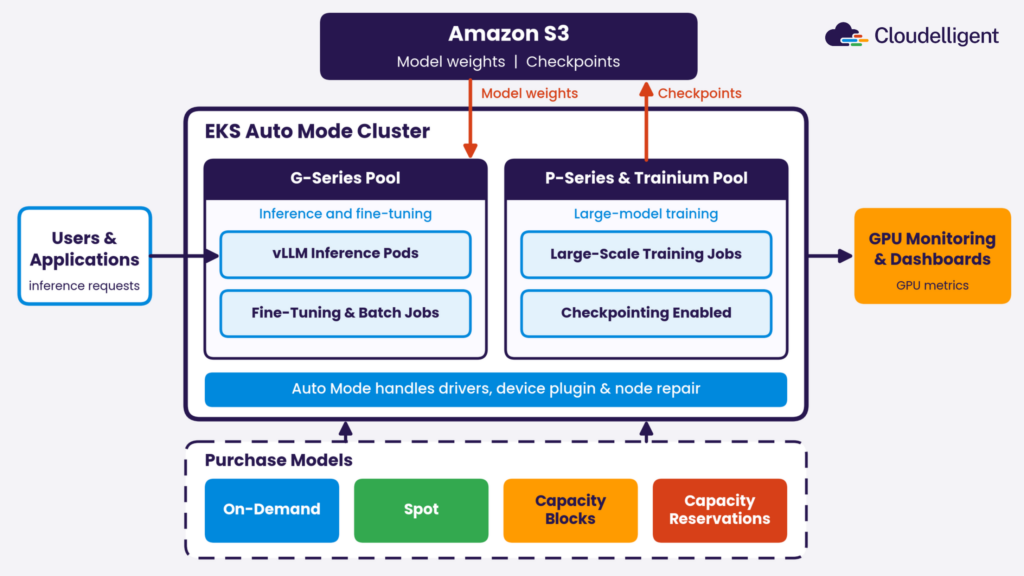
Figure 1: Reference Architecture for GPU Workloads on Amazon EKS Auto Mode
At the center sits an EKS Auto Mode cluster with separate node pools for G-series and P-series or AWS Trainium instances. A layer of AWS purchase options sits beneath it, covering On-Demand, Spot, Capacity Blocks, and capacity reservations. Meanwhile, vLLM inference pods pull model weights from Amazon S3, training jobs write checkpoints back to S3, and GPU monitoring feeds your dashboards.
What EKS Auto Mode Handles for You
Auto Mode takes a large share of GPU operations off your plate. According to the Amazon EKS accelerated workload documentation, it handles several chores that used to eat engineering time:
- Drivers and plugins: Manages NVIDIA and AWS Neuron drivers and the device plugin.
- Image pulls: Pulls and unpacks container images in parallel on GPU instances with local NVMe storage.
- Node repair: Repairs nodes after GPU hardware failures.
What Your Team Still Owns
Even so, Auto Mode doesn’t make GPU decisions for you. Your team still owns the choices that shape cost and reliability:
- Instance selection: You match instance type, GPU memory size, and CUDA compatibility to each model.
- Scheduling rules: You set taints and tolerations so only GPU workloads land on GPU nodes.
- Checkpointing: You save progress regularly so a Spot interruption doesn’t erase hours of work.
- Consolidation settings: You protect interruption-sensitive jobs from being moved at the wrong moment.
- Node lifetime: Auto Mode replaces nodes after 21 days at most, and you can shorten that limit. Multi-week training runs need checkpointing to survive a replacement, and blocking pod disruption budgets can require your attention.
Running LLM Inference With vLLM on EKS
vLLM is a popular engine for high-throughput LLM serving. Running it on EKS lets you scale replicas with demand instead of paying for a fixed fleet.
The usual objection is slow starts, since a new pod can sit idle for minutes while it loads multi-gigabyte model weights. However, streaming those weights from Amazon S3 to the GPU can cut the wait to seconds.
Conversely, fast starts change the build-vs-rent math. Scaling to zero between bursts becomes practical, so idle GPUs stop draining your budget. The AWS vLLM Deep Learning Containers are also free, so the serving software adds nothing to your bill.
GPU Utilization Decides the Build-vs-Rent Question
Here’s the number that should be considered. AWS best practices point out that traditional allocation often leaves production GPUs at 30-40% utilization. Teams that adopt sharing strategies report 80-90%.
Every hour you pay for AWS GPU instances, or for a rack you own, the meter runs whether the chip works or not. Before you size anything, measure what your GPUs actually do. AWS suggests comparing power draw against the power limit, which tells you more than a raw utilization percentage.
The good news is that low utilization is fixable. The first lever is sharing, which lets several workloads use one GPU instead of leaving it idle.
Time-Slicing, MIG, and MPS: Which Sharing Method Fits?
Three techniques make this possible. Each trades isolation for flexibility differently:
- Time-slicing: Workloads take turns on the GPU. It’s simple and flexible, but there’s no memory isolation between them.
- Multi-Instance GPU (MIG): The hardware splits one GPU into isolated partitions. You get strong isolation, but only on supported GPUs and fixed partition sizes.
- Multi-Process Service (MPS): Processes run concurrently on the same GPU. Throughput improves, though isolation is better than time-slicing but weaker than MIG.
Check which of these your chosen node setup supports before you design around them. Support varies by GPU type and cluster configuration. One catch: AWS documents MIG and MPS sharing through Dynamic Resource Allocation (DRA) on managed node groups only. Auto Mode uses Karpenter, which that documentation doesn’t cover.
You must also confirm with AWS which sharing methods your Auto Mode setup supports. If you need MIG or MPS today, plan on managed node groups for those workloads.
Sharing raises utilization on the GPUs you run. The second lever is how you pay for them.
Matching Purchase Models to Workloads
How you buy capacity matters just as much as how busy the GPUs are:
- Spot: Up to 90% off On-Demand pricing, with a two-minute interruption notice. It works best for fault-tolerant jobs.
- Capacity Blocks: Pre-paid reservations for P-series and Trainium instances, typically running from 24 hours to 182 days.
- On-Demand Capacity Reservations: Guaranteed capacity in a chosen Availability Zone, a common fit for G-series, billed at the On-Demand rate whether you use it or not.
Notice the pattern. A GPU you own costs the same whether it’s busy or idle, and reserved capacity behaves the same way.
Cost Modeling with the New EKS Auto Mode GPU Pricing
Now for the part you came for. Let’s work through what the July 2026 pricing change does and doesn’t do to your bill.
What Changed on July 1, 2026
AWS announced lower Auto Mode management fees for accelerated instances, effective July 1. The AWS announcement lays out the cuts:
- G-series instances: Management fees dropped 35%.
- P-series and Trainium instances: Management fees dropped 60%.
- Availability: The cuts apply automatically in every Region where Auto Mode is available.
What the Fee Cut Does and Doesn’t Change
Auto Mode charges a fee on top of the Amazon Elastic Compute Cloud (Amazon EC2) instance price. AWS bills it per second. The fee is the same whether you run On-Demand, Savings Plans, or Spot.
Therefore, the cut lowers your operations premium. It does not change your hourly GPU rate. The table below shows the impact using US East (N. Virginia) rates.
| p5.48xlarge (P-series) | g6e.xlarge (G-series) | |
| Fee cut | 60% | 35% |
| EC2 instance price per hour (On-Demand) | $55.04 | $1.861 |
| Auto Mode fee per hour, before (derived from the cut) | about $6.60 | about $0.22 |
| Auto Mode fee per hour, now | $2.64 | $0.145 |
| Savings per hour | about $3.96 | about $0.08 |
| Savings per node per month | about $2,890 | about $57 |
| Savings as a share of previous total cost | about 6% | about 4% |
Table 3: Auto Mode Fee Savings by Instance (assumes the node runs 24/7, about 730 hours per month)
AWS publishes only current rates, so we worked backward from each cut. In both cases, the previous fee was about 12% of the instance price.
The savings are real but small. They come to about 6% of the total node cost on P-series and 4% on G-series.
The cut matters most at fleet scale. If you plan to run Auto Mode on more than 150 nodes, AWS asks you to contact your account team. Even so, utilization and purchase model change your bill far more.
A Build-vs-Rent Cost Model You Can Reuse
Start by listing every cost line on both sides. Dedicated setups hide many of their costs, so check the table below for full visibility.
| Cost Line | Dedicated or Colocated | AWS GPU-Ready Kubernetes |
| Compute | Hardware amortization | EC2 GPU instances |
| Platform fee | None | EKS cluster fee ($0.10 per cluster per hour) plus the Auto Mode management fee |
| Facility | Power, cooling, or colocation fees | Included in instance price |
| Networking | Switches, cabling, interconnects | Virtual networking, cross-AZ traffic, public IPv4 addresses, and data transfer |
| Storage | Local or on-premises arrays | Amazon S3 and block storage |
| People | Hardware and facility operations staff | Platform engineering time |
| Refresh | Hardware replacement every few years | None |
| Idle time | You pay in full | You scale down or release |
Table 4: Cost Lines for Dedicated Versus AWS GPU Infrastructure
Then apply one formula to both. It tells you what each GPU hour really costs once idle time is counted:
Effective cost per useful GPU-hour = total monthly cost ÷ (GPUs × 730 × utilization)
Utilization sits in the denominator, so small changes move the result a lot. A p5.48xlarge has eight GPUs. With On-Demand pricing and the current Auto Mode fee, that comes to about $7.21 per GPU-hour. Table 5 shows the cost per useful hour, with a Spot column for comparison.
| GPU Utilization | On-Demand | Spot (57% savings as of October 2026) |
| 30% | $24.03 | $10.96 |
| 50% | $14.42 | $6.58 |
| 80% | $9.01 | $4.11 |
Table 5: How Utilization Changes the Cost of a Useful GPU-Hour (Illustrative, p5.48xlarge, US East)
The Spot column uses the 57% savings that the Amazon EC2 Spot Instance Advisor shows for the p5.48xlarge. Spot prices change.
The Auto Mode fee stays the same on Spot, so it makes up a bigger share of the bill. On Spot, the July cut saves about 13% of previous total cost, compared with about 6% On-Demand. Spot only suits jobs that can handle interruptions, so use it where checkpointing is in place.
Consider a hypothetical team running eight-GPU nodes On-Demand at 35% utilization. That falls within the 30-40% range AWS reports. Their effective cost is near $20.60 per useful hour.
Pooling, sharing, and scale-to-zero could lift utilization to 80%. Then the cost drops to about $9.01, a cut of more than half. The fee reduction alone saves only about 6%.
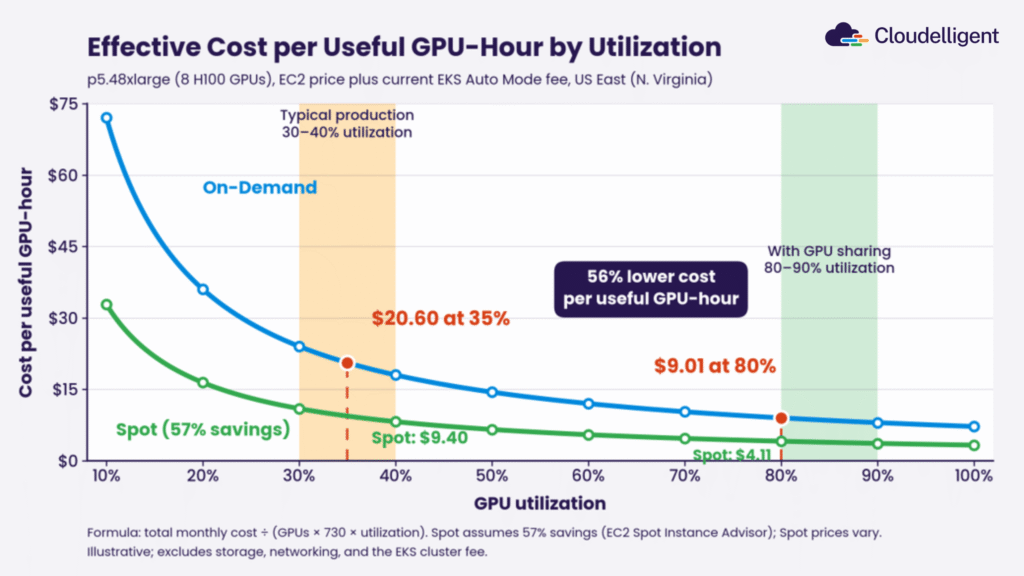
Figure 2: Effective Cost per Useful GPU-Hour by Utilization
The same math applies to hardware you own. Plug your fixed monthly cost into the formula and find the utilization where owning beats renting. That crossover point is your build-vs-rent answer.
Migrating From a Dedicated GPU Setup to AWS
If the numbers favor moving, you don’t need a big-bang migration. We suggest a staged path, and you can follow it in order:
- Discover and assess: Profile real GPU utilization and cost goals, then map each workload to a pattern using Table 2. If agentic AI is driving your GPU demand, our guide to key agentic AI decisions can help frame the planning.
- Lay the foundation: Set up AWS access, networking, storage, and GPU capacity. Use Virtual Private Cloud (VPC), Elastic Fabric Adapter (EFA), and Identity and Access Management (IAM), all as infrastructure as code (IaC).
- Build and tune: Deploy EKS with vLLM, AWS Batch, or ParallelCluster. Add checkpointing, taints and tolerations, and Spot wherever jobs tolerate it.
- Validate and hand over: Benchmark performance, set up observability, and document a runbook and cost playbook.
- Keep what must stay dedicated: Run a hybrid setup, with on-premises GPUs joining as EKS Hybrid Nodes under one control plane. AWS bills hybrid nodes per vCPU per hour, starting at $0.020. It asks you to contact your account team for machines above 32 vCPUs, which can include large GPU servers.
Our Kubernetes solutions team helps with steps two through four. That support is handy when your platform engineers are already stretched.
Prove It Before You Commit with the AWS HPC & GPU Activator
A spreadsheet can’t tell you how your workloads behave on AWS. Real benchmarks can, and you can collect them before you sign a hardware order or a long reservation.
That’s why we built the HPC & GPU Activator. It’s a three-week proof of value that tests your own workloads on AWS.
What the Three-Week Proof of Value Delivers
By the end of the engagement, you have a working HPC and GPU platform live in your AWS account. It includes:
- EKS with vLLM: High-throughput LLM inference.
- AWS Batch: Parallel GPU jobs that scale to zero.
- AWS ParallelCluster: Slurm, EFA, and Amazon FSx for HPC and training.
- Cost controls: Autoscaling, Spot, and spending guardrails, all defined as code.
You also get benchmark results, observability, a runbook, and a cost playbook. The brief cites savings of up to 90% with EC2 Spot versus On-Demand, which applies to Spot-friendly workloads.
Who It Fits
The Activator suits teams at a decision point. You might be:
- Weighing a dedicated GPU build or a colocated purchase.
- Running GPUs with unknown or low utilization.
- Preparing benchmark numbers for a leadership decision.
As an AWS Premier Tier Services Partner, we’ve built this around a cost-first approach. You own everything we build.
Choose the Infrastructure Your Workloads Really Need
An AI data center is the right call for a narrow set of workloads. For most mid-market and enterprise teams, GPU-ready infrastructure on AWS covers the need with less capital and a bill that tracks real usage.
Not sure where your workloads land? Start with Cloudelligent’s AWS HPC & GPU Activator. It benchmarks your GPU workloads and hands you a cost playbook. Get your proof of value in just three weeks.
Frequently Asked Questions
It’s a facility built for AI workloads, with dense GPU or accelerator clusters, fast networking, and heavy power and cooling. Hyperscalers build them at massive scale. Most mid-market and enterprise teams rent comparable capacity from cloud providers instead of building their own.
Usually not. Dedicated infrastructure pays off for steady, high-utilization training, strict data residency, or tight on-premises latency needs. Spiky, shared, or interruption-tolerant workloads run well on cloud GPU capacity, where you pay for what you use. Measure your utilization before you decide.
Yes. Amazon EKS supports GPU and AWS Trainium workloads, and Auto Mode manages drivers, the device plugin, and node repair for you. Your team still owns instance selection, scheduling rules such as taints and tolerations, and checkpointing for interruptible capacity.
Auto Mode charges a management fee on top of the EC2 instance price. Since July 1, 2026, that fee is 35% lower on G-series and 60% lower on P-series and Trainium instances. Check the Amazon EKS pricing page for current rates in your Region.
Owned hardware wins when GPUs stay busy nearly all day or data can’t leave your facility. It also fits workloads that need very low latency to local systems. Under those conditions, fixed costs spread across many useful hours.
Yes. EKS Hybrid Nodes let you run on-premises GPUs under the same Kubernetes control plane as your cloud nodes. You can keep steady or regulated workloads on-premises and send spiky inference or batch jobs to AWS.
A proof of value is a short, hands-on engagement that tests your own workloads before you commit budget. The Cloudelligent AWS HPC & GPU Activator runs three weeks. We profile your workloads, build a working platform in your AWS account, benchmark it, and hand over a runbook and cost playbook.