







When a critical PHP vulnerability hits your inbox, the clock starts ticking immediately. Before you can patch anything, you need one fast answer: where does PHP run in your AWS account? You check the servers you know of, yet you worry that a hidden copy goes unnoticed.
The stakes are higher with PHP2Shell, which refers to two critical PHP vulnerabilities known as CVE-2026-109618 and CVE-2026-109619. Since PHP processes the malicious payload before any application code or authentication checks an authenticated attacker can send crafted web requests ttorun code or read private data.
With PHP2Shell out there, the greatest danger lies in missing even one PHP install. Since our developers review AWS environments, they see how easily PHP hides in them.
Under the AWS shared responsibility model, every copy is yours to secure, so leave no install unpatched. In this guide we will show you how to find every instance, apply patches, rotate your keys, and check for a breach.
What Is the PHP2Shell PHP Vulnerability?
PHP2Shell is a pair of PHP remote code execution flaws that allow an unauthenticated attacker to run code on a vulnerable server. This makes PHP2Shell a PHP RCE vulnerability, short for remote code execution.
Here is how each one works:
- CVE-2026-109618: After a memory allocation fails, PHP leaves invalid data behind for its cleanup routine, which treats that data as valid.
- CVE-2026-109619: A PHP worker can reuse stale state from a previous request. That state can point to freed memory, which a later request can follow.
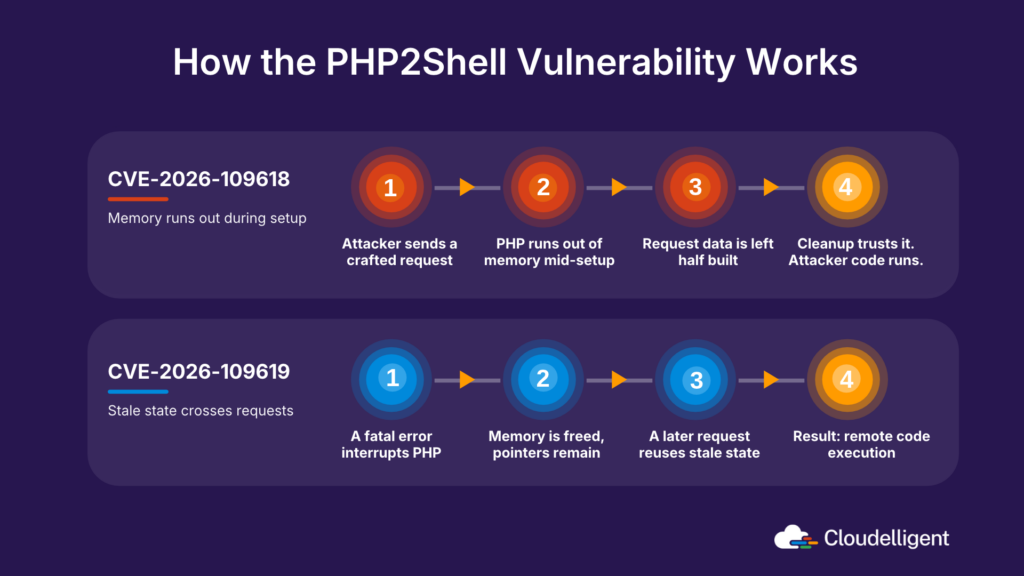
Figure 1: How the PHP2Shell vulnerability works
Both score 9.2 out of 10 on the Common Vulnerability Scoring System (CVSS) v4.0, which rates that as Critical.
Note: Common Vulnerability Scoring System (CVSS) v4.0 is an open standard that scores the severity of software and hardware vulnerabilities from 0.0 to 10.0.
Let’s look at why this PHP vulnerability is critical:
- Exposure from PHP itself: PHP processes the malicious request before any application code runs. As a result, login checks cannot defend against it.
- Reach across PHP servers: Every PHP installation that serves web requests is affected. This includes PHP-FPM, Apache mod_php, php-cgi, FrankenPHP, and LiteSpeed.
- Secrets read from memory: Attackers can also read PHP worker memory without logging in. This can expose passwords, authentication tokens, and API keys.
Which PHP Versions Are Affected by PHP2Shell?
Recent PHP vulnerability news shows that PHP2Shell affects every PHP installation that serves web requests. This is why the next step is to check your version.
Although PHP fixed both flaws in its supported 8.2 to 8.5 branches, PHP 8.1 and older received no official release. According to research of 156 million PHP installations of known PHP versions, 110 million run end-of-life or end-of-support branches. That is 71%, which makes older PHP the hardest part of patching.
Because so many installations run old branches, you need to check where yours falls in this PHP vulnerability list for CVE-2026-109618 and CVE-2026-109619:
| PHP branch | Affected versions | First fixed version |
| 8.5 | 8.5.0 to 8.5.11 | 8.5.12 |
| 8.4 | 8.4.0 to 8.4.26 | 8.4.27 |
| 8.3 | 8.3.0 to 8.3.35 | 8.3.36 |
| 8.2 | 8.2.0 to 8.2.34 | 8.2.35 |
| 5.4 to 8.1 | All versions | No upstream fix. Migrate to a supported branch. |
Table 1: PHP vulnerabilities in PHP2Shell, with affected versions and the first fixed release for each branch
If your PHP needs patching, you cannot just apply a workaround. In fact, AWS says upgrading to a patched PHP release is the only complete fix, and no interim control is a complete mitigation.
The picture is harder for PHP 8.1 and older. PHP released limited source backports for 7.4, 8.0, and 8.1, and some vendors offer fixes. Even so, according to AWS, migration to a supported branch is required Cloudelligent’s Application Modernization services can help with that move.
This table shows each older branch’s support status and what PHP did for it:
| Branch | Upstream status | PHP2Shell fix from PHP |
| 8.2 | Supported until 31 Dec 2026 | Fixed in 8.2.35, but plan to move on |
| 8.1 | End of life 31 Dec 2025 | Limited source backport only |
| 8.0 | End of life Nov 2023 | Limited source backport only |
| 7.4 | End of life Nov 2022 | Limited source backport only |
| 7.3 and older, PHP 5 | Long end of life | None; affected (Sansec traces the bugs back to PHP 5.4) |
Table 2: Upstream status and PHP2Shell fix by PHP branch
How to Find Every Place PHP Runs in Your AWS Environment
Once you know which versions are affected, the next step is to find every place PHP runs. You can start by identifying every system that runs PHP across your infrastructure, beginning with internet-facing workloads. Do not limit your search to outdated versions only, every copy needs to be accounted for.
This table shows where PHP often hides on AWS:
| Where PHP runs | Why it counts |
| Amazon EC2 instances | Amazon Linux has updated PHP packages in all Regions. |
| Containers on ECS or EKS | Every PHP copy counts, including those inside containers. |
| AWS Elastic Beanstalk | AWS released updated platform versions for PHP 8.2 through 8.5. |
| Amazon Lightsail | WordPress, WordPress Multisite, LAMP, Nginx and Bitnami blueprints include PHP. |
| WordPress, Magento and other products | PHP-based apps are exposed even when their own code is clean. Sansec also names Drupal, Joomla, Laravel and Symfony. |
Table 3: Where PHP runs in an AWS environment
Knowing where PHP can run helps, but you still need to locate each installation. Let’s look at three ways you can do this:
- Amazon Inspector findings: It scans EC2 instances, Lambda functions, and ECR container images, and rescans all workloads when a new CVE is published. However, it will not see PHP on Lightsail or on servers outside AWS.
- Systems Manager Inventory: Filter its results on the php application name. It only shows packages installed through the OS package manager, so bundled builds such as Bitnami’s will not show up.
- Direct checks on the host: Run php -v and php-fpm -v, since the command-line and PHP-FPM binaries can differ. Even then, php -v may report a different installation from the one serving web requests. On Lightsail Bitnami instances, run /opt/bitnami/php/bin/php -v.
If you use a PHP vulnerability scanner, test it outside production first, because some checks can crash unpatched apps. However, if you check PHP code for vulnerabilities, you will not find PHP2Shell, because the flaw is in the PHP runtime, not in your code.
Unsure if you found every PHP install? Get a FREE Well-Architected health check to review your AWS environment against best practices.
How to Patch PHP on EC2, Elastic Beanstalk and Lightsail
After you find every PHP install, you need to apply the PHP security update, starting with your internet-facing systems. The fix depends on the service, as this table shows:
| Service | The fix |
| EC2 on Amazon Linux | Apply the updated PHP packages. They are available in all Regions. |
| Elastic Beanstalk | AWS released updated platform versions for PHP 8.2 through 8.5. Managed Platform Updates apply them in the next maintenance window. Otherwise, update the platform version yourself. |
| Lightsail (WordPress, Multisite, LAMP, Nginx blueprints) | Snapshot, run apt update and apt upgrade, restart the web server, then run php -v. |
| Lightsail (Bitnami blueprints) | Bitnami ships its own PHP copy that apt upgrade does not update. AWS recommends moving to a Lightsail blueprint. |
Table 4: How to patch PHP on EC2, Elastic Beanstalk and Lightsail
It’s important to note that patching does not end with the upgrade. A package upgrade does nothing for processes already in memory. So, you must restart every PHP-FPM pool and every web server that loads PHP. Additionally, you can restart every queue consumer and long-running cron worker as well.
Restarting covers servers that run PHP, but containers need one more step. An image built before October 21st is vulnerable, even if its tag looks current. In such cases, you can rebuild it from a fresh base image and redeploy it.
Rebuilding and redeploying is easier when deployments are automated. See how Cloudelligent automated infrastructure deployments for a retail company.
How to Patch PHP at Scale with AWS Systems Manager Patch Manager
Patching each service by hand is manageable for a few servers, but it breaks down across a growing fleet. Fortunately, AWS Systems Manager Patch Manager automates patching of managed nodes, such as EC2 instances, with security-related updates. Here is what you should know before you start:
- Two run modes: A Scan operation shows only a report of missing patches. Scan and install automatically installs them.
- Patch baselines: A patch baseline is a set of rules for which patches to install, such as auto-approving patches within days of their release. AWS says its predefined baselines are examples, not best practices, so build a custom baseline for your fleet.
- Patch testing: AWS does not test patches before making them available in Patch Manager. So, patch a non-production group first, then internet-facing production systems, then internal systems.
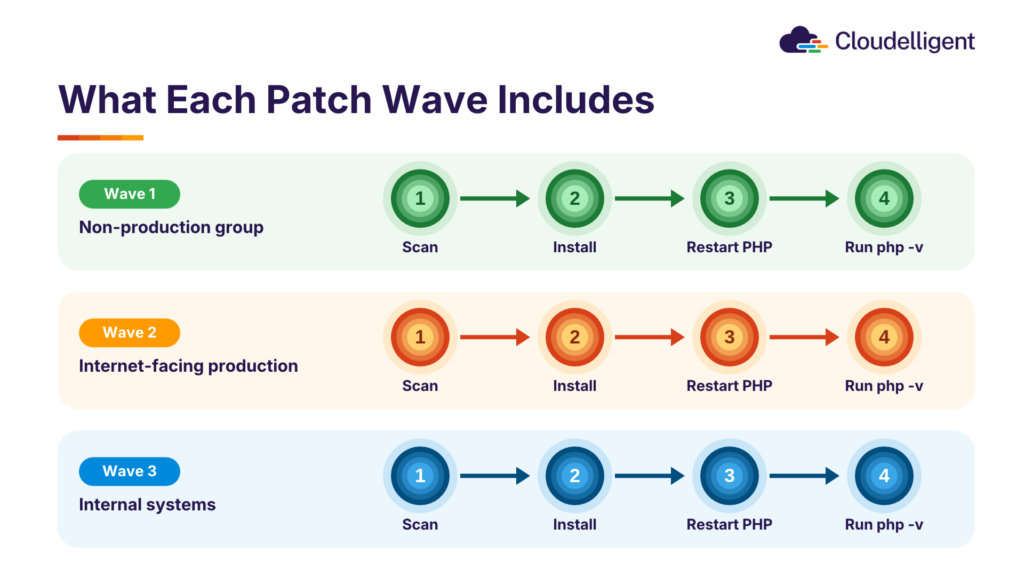
Figure 2: What each patch wave goes through in AWS Systems Manager Patch Manager
For more on this tool, read our blog on AWS Systems Manager for Day 2 Operations.
When Temporary Fixes For PHP2Shell Are and Are Not Enough
If a system cannot be patched right away, a temporary fix can buy time, though they won’t close the vulnerability completely. According to AWS, upgrading to a patched PHP release is the only complete fix. Interim controls only reduce exposure, so use them while you update.
The table lists your options:
| Temporary fix | What it covers | Where it falls short |
| AWS WAF PHP application managed rule group (AWSManagedRulesPHPRuleSet) | PHP2Shell_BODY covers CVE-2026-109619 (version 2.3 and later). PHP2Shell_BODY_Extended covers CVE-2026-109618 (version 2.4 and later). Both default to Block. | Teams pinned to an older rule version must update it. For multipart uploads, AWS WAF reduces risk but does not close the vulnerability. |
| session.upload_progress.enabled=0 | CVE-2026-109619. On PHP 8.5 also set fatal_error_backtraces=0. | Load it before PHP parses the request, then restart every worker. It reduces exposure only. |
| Take the system offline | Any system you cannot patch or protect in time. | The system is unavailable. |
Table 5: Temporary fixes for PHP2Shell and where each falls short
If you use AWS WAF, check two things before you rely on it:
- Rule action: Confirm both PHP2Shell rules are not overridden to Count. Count only reviews matches and does not block them.
- Rule version: Customers on the default version are protected automatically. If you pinned a version, update it.
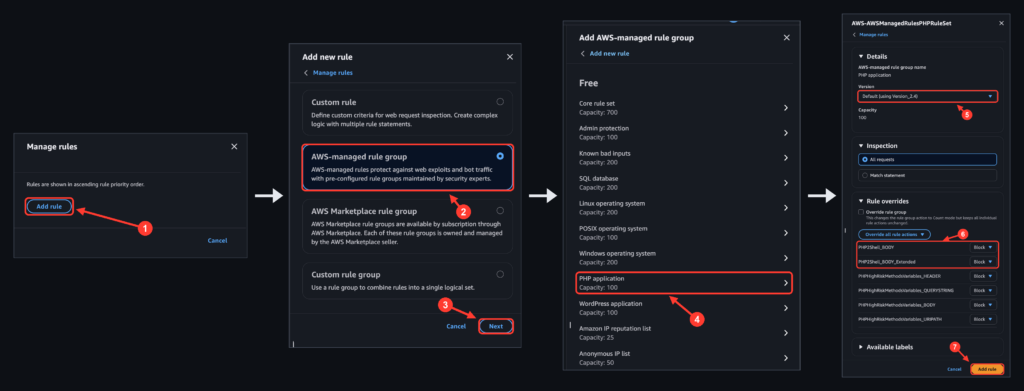
Figure 3: Adding the AWS WAF PHP application managed rule group in the console (Source: AWS Blog)
If you cannot apply these mitigations, or they would take too long, consider taking the system offline until it is fully mitigated. If you cannot update or disable it right away, check for signs of compromise.
Until a system is patched, you need to watch it closely for signs of compromise. See how Cloudelligent added threat monitoring and 24/7 managed support for a global nonprofit.
How to Check for Signs of Compromise
Patching closes the hole, but it cannot remove an attacker who got in first. Take time to check any system that ran an unpatched version while exposed. This checklist can guide you:
[ ] Look for PHP workers that exit on memory errors in bursts.
[ ] Look for PHP worker processes that start a shell, an interpreter, or a network tool.
[ ] Rotate AWS access keys and any secrets the server could read, since attackers can read PHP worker memory. Deactivate old keys instead of deleting them, so the evidence stays intact.
[ ] Check AWS CloudTrail and Cost Explorer for unexpected Amazon Bedrock charges. Stolen keys can fuel LLMjacking, where attackers run AI models on your account. Read our guide on IAM security gaps that lead to LLMjacking for full steps.
[ ] Call for help if you lack the capability in-house. Our Managed Detection and Response service offers 24/7 monitoring, proactive threat detection, and swift incident response.
Find and Fix Your PHP Exposure with Cloudelligent
You now know how to find PHP, patch it, and check for compromise. If you would like support, our team is ready to help. Our cloud security assessment includes an AWS security scan that identifies PHP installations and versions across your systems.
It also flags systems that remain vulnerable to CVE-2026-109618 and CVE-2026-109619. In addition, it looks for indicators of compromise on exposed systems and provides a prioritized remediation plan. You can schedule a FREE cloud security assessment to see where your PHP exposure stands.
Frequently Asked Questions
PHP fixed both flaws in four releases: 8.5.12, 8.4.27, 8.3.36, and 8.2.35. You can update to the release that matches your PHP branch. PHP 8.1 and older have no official fix, so you must migrate to a supported branch.
Yes, PHP that runs on AWS is affected. AWS published security bulletin 2026-143-AWS and released fixes for Amazon Linux and Elastic Beanstalk. Under the shared responsibility model, you must patch the PHP you manage.
No. The flaw is in the PHP runtime, not in WordPress. You must update PHP itself, because PHP handles the request before application code runs.
AWS WAF can reduce risk, but it is not a complete fix. The AWSManagedRulesPHPRuleSet rule group includes two PHP2Shell rules, and both default to Block. Upgrading PHP is still the only complete fix.
On Amazon Linux, apply the updated PHP packages, which are available in all Regions. Then restart every PHP-FPM pool and every web server that loads PHP. A package upgrade does not change processes already in memory.
You must rebuild the image from a fresh base image and redeploy it. An image built before October 21st is vulnerable even if its tag looks current.
Attackers can read secrets from server memory, and stolen keys can fuel LLMjacking. Rotate your AWS access keys and secrets. Then check CloudTrail and Cost Explorer for unexpected Bedrock charges.
PHP released limited source backports for 7.4, 8.0, and 8.1. Even so, AWS says you must migrate to a supported branch.